
Problem
When attempting to install a package from the Library, the installation may appear to complete successfully, but no list of installed components is displayed (Cause A or B). Alternatively, you may receive a message indicating that the installation has failed (Cause C).
Cause
Cause A
The WordPress REST API may be blocked by a security plugin.
Cause B
HTTP Status Code: 403; Code: rest_cookie_invalid_nonce; Message: Cookie check failed.
Cause C
A conflict is caused by duplicate IDs, for example when custom Content Blockers, Providers, Script Blockers, Services, or Style Blockers have been created.
Cause D
An .htaccess rule modifies URLs and automatically appends a trailing / to every URL.
Cause E
Your website is hosted by Strato and the guestbook spam protection feature is enabled.
Solution
Solution A
Check whether a plugin is blocking the WordPress REST API and configure it correctly so that the required REST API routes are not blocked.
Solution B
Your WordPress authentication cookie has expired. Please log out of WordPress and then log back in.
Solution C
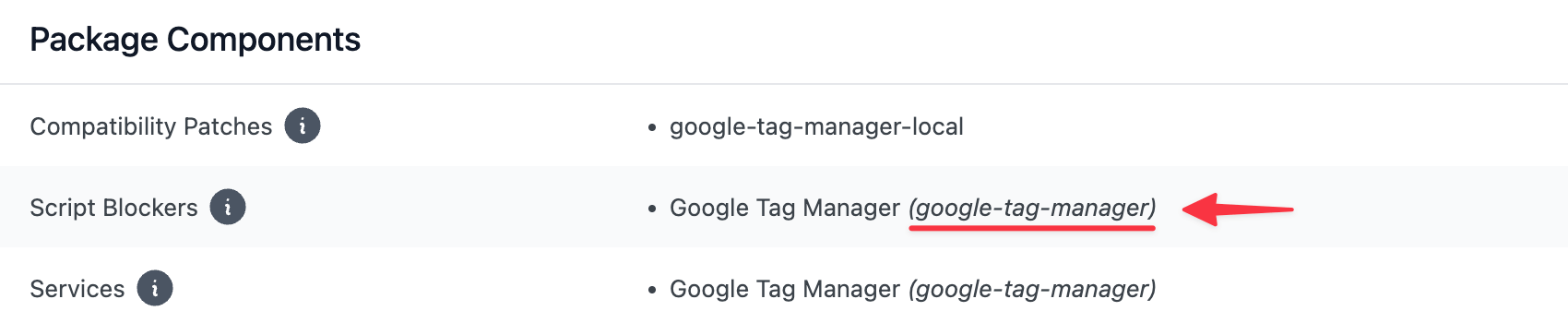
Ensure that any custom Content Blockers, Providers, Script Blockers, Services, or Style Blockers you have created do not use the same IDs as the components contained in the package you are trying to install.
The ID of each component is displayed in parentheses directly after the component name.
Solution D
Adjust your .htaccess configuration so that a trailing / is not automatically appended to every URL.
Solution E
In your Strato hosting settings, navigate to "Security" > "Guestbook Spam Settings" and set the filter to "Filter Disabled".